It seems like every federation conversation I’m part of eventually lands on the same sentence: “We don’t really need Conditional Access, ‘Insert 3rd party IdP here’ handles our MFA.”
And honestly? I get it. You bought an IdP, you configured policies there, and now somebody wants you to configure it again somewhere else. That feels like paying for the same thing twice.
Which makes sense… in theory. But…..

Quick scope check before we go anywhere. This is about domains federated to a third-party IdP. Everything here was tested with Okta in my lab, as of the time of writing. If you’re on Password Hash Sync with no federation, most of this still applies to you, you just skip the part where two identity systems quietly disagree with each other.
Who’s actually doing what here?
If you read Breaking Up with Your IdP, you’ve seen this flow before. When a user on a federated domain signs in, Entra ID recognizes the domain, puts up a “not my problem” sign, and sends them to your 3rd party IdP, in this case Okta. Okta validates the credentials, does its MFA, and hands an assertion back to Entra.
That’s usually where people stop reading the flow. It’s the wrong place to stop.
Okta doesn’t hand the user a token for Exchange or SharePoint or Teams. Entra does. Okta’s assertion is input to Entra’s decision, it isn’t the decision. And the moment Entra decides whether to issue that token is exactly where Conditional Access lives.
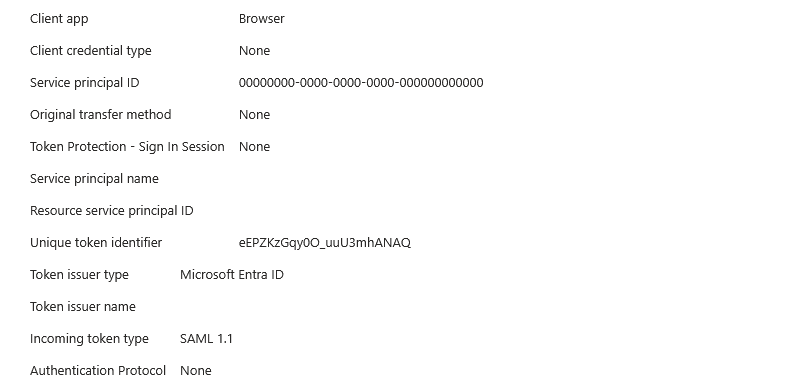
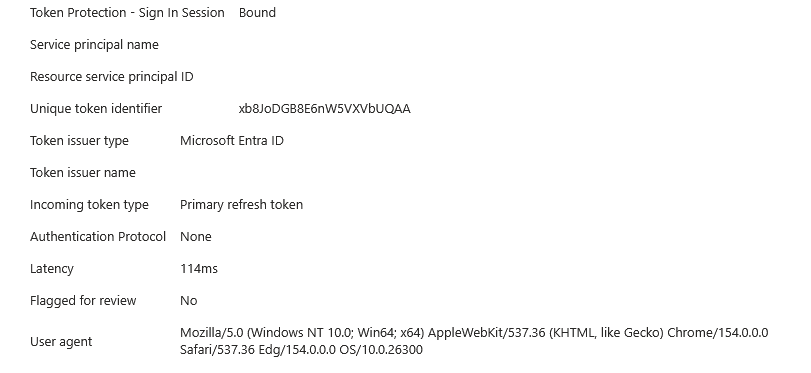
Notice the Incoming token type: SAML 1.1. That’s Okta’s assertion arriving. Now notice Token issuer type: Microsoft Entra ID. That’s who is actually handing out the keys.
So Okta answers “who are you?” Whether this person gets a token, for this app, from this device, right now, is still Entra’s call. Federation moved one question somewhere else. It didn’t move the other one.
Right. Let’s test that theory.
John Smith was unavailable, so Allan Deyoung volunteered. Allan’s domain is federated to Okta, and Allan has a passkey registered in Okta. That’s phishing-resistant MFA at the IdP, about as good as it gets.
On the Entra side, I created a Conditional Access policy scoped to Allan that requires an Authentication Strength, specifically the built-in Phishing-resistant MFA strength.
Passkey at Okta, phishing-resistant MFA required by Entra. Surely this lines up.
Allan signs in. Lets check Okta’s System Log:
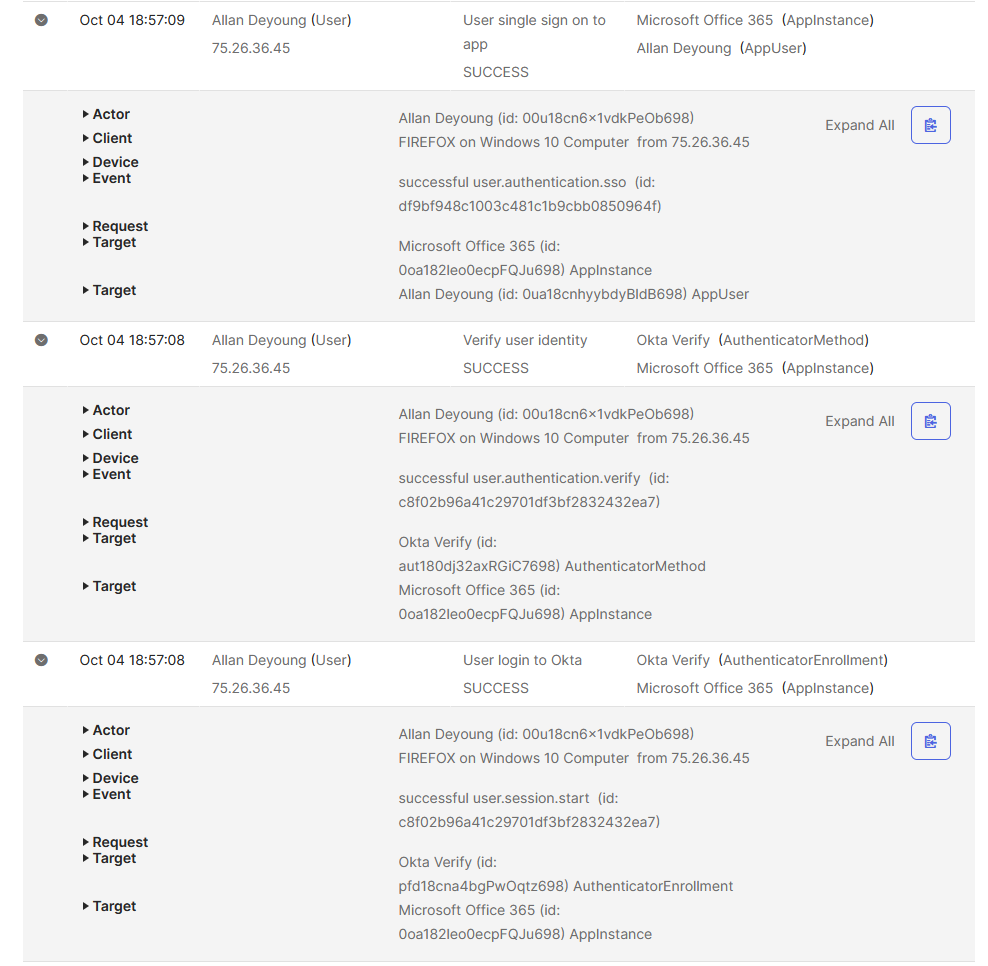
As you can see, Okta is thrilled. User login to Okta: success. Verify user identity: success. Single sign-on to Microsoft Office 365: success.
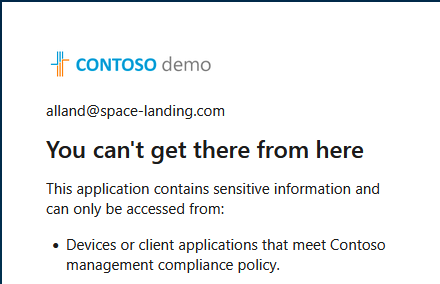
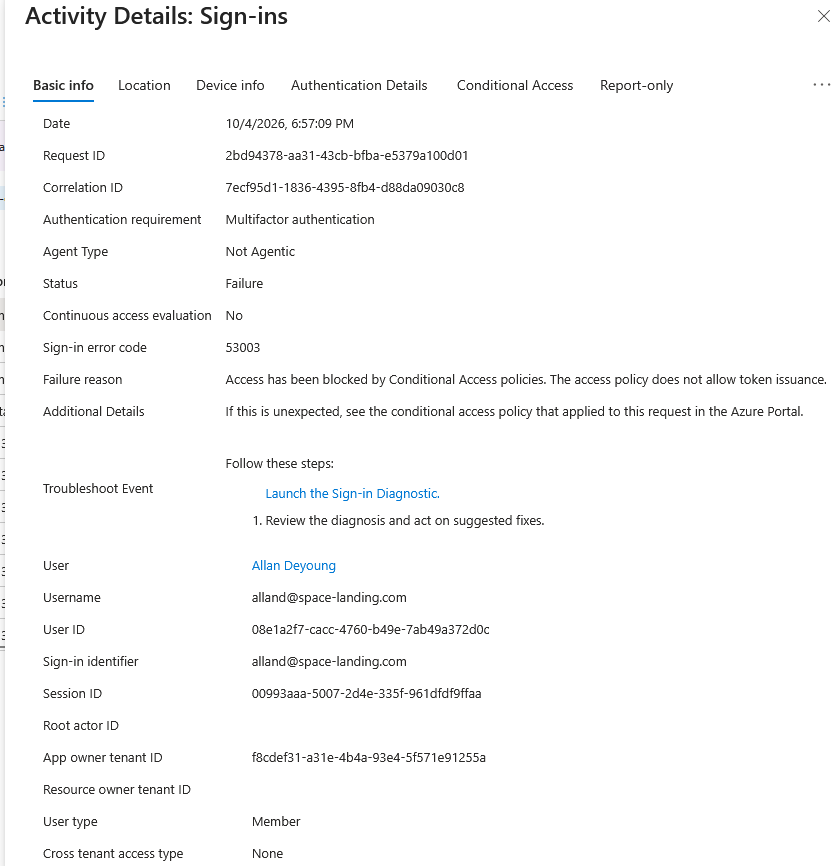
And then Allan sees this:
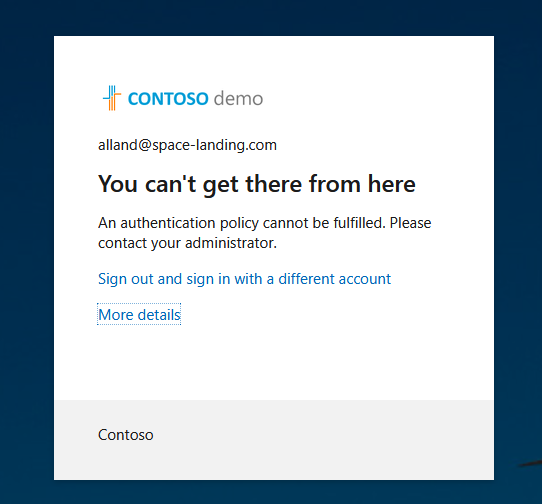
Welp.
Error 53003, and in Entra’s words, the access policy does not allow token issuance. It’s the same second Okta logged its success. Okta said yes, Entra said no.
The Authentication Details tab is even more interesting:
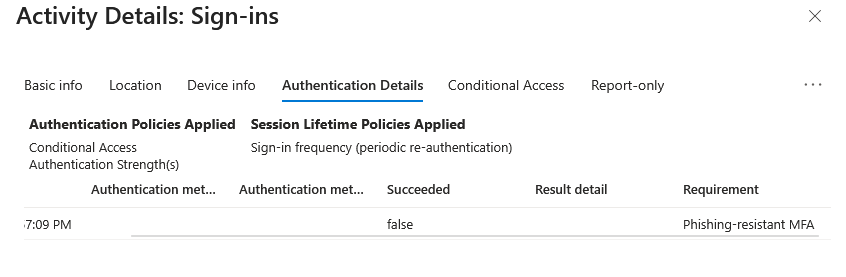
The requirement is Phishing-resistant MFA, it failed, and the authentication method columns are completely empty. Entra didn’t log a weak method and reject it. It didn’t credit Allan’s sign-in with anything that could satisfy the requirement.
Is the policy just broken?
Fair question. So I changed one thing: I swapped the strength to the built-in Multifactor authentication strength. Same user, same passkey, same Okta, same everything else.
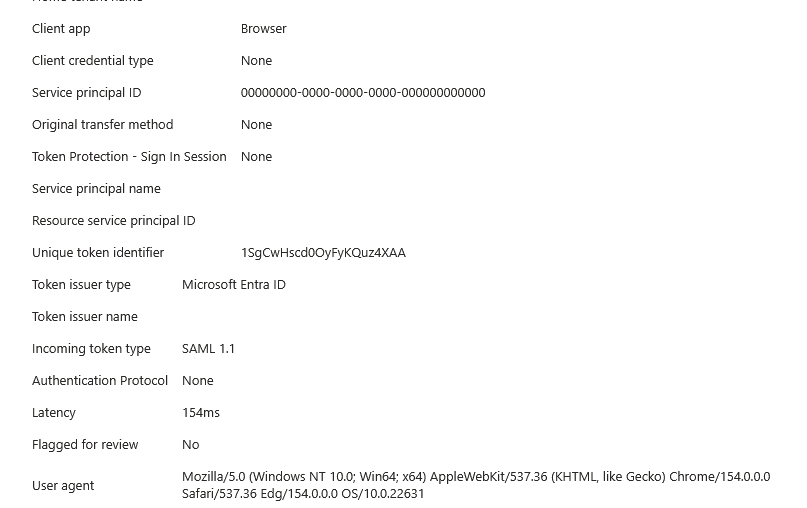
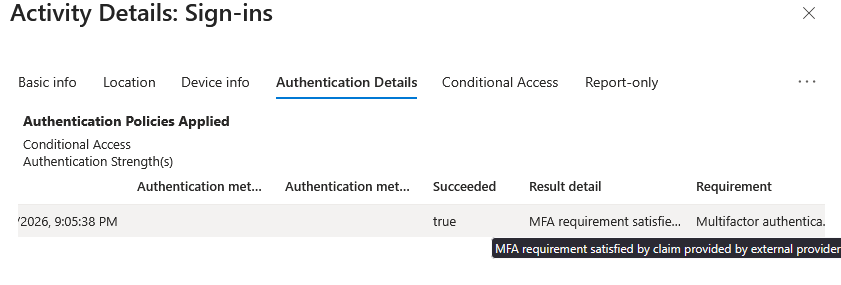
It works. And notice how Entra describes what happened: “MFA requirement satisfied by claim provided by external provider.” That’s the tell. Entra didn’t check a method. It accepted Okta’s claim that MFA already happened.
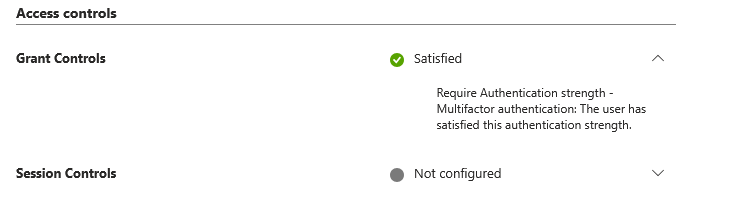
And Conditional Access agrees. Grant Controls: Satisfied.
That is the same verdict screen that told Allan to get lost a few screenshots ago. Nothing changed about Allan, his passkey, or Okta. The only thing that changed is which strength the policy asked for. Require Multifactor authentication, and Okta’s claim clears it. Require Phishing-resistant MFA, and that same claim isn’t enough, because Entra is being asked for a method it never actually saw.
The policy isn’t broken, and federation isn’t broken. This is one specific requirement that a federated sign-in can’t satisfy.
So what’s going on?
Every federated domain has a setting called federatedIdpMfaBehavior, which controls how Entra treats MFA done by the federated IdP. Here’s mine:

With enforceMfaByFederatedIdp, Microsoft’s documentation says the user has to authenticate at the federated IdP and can only satisfy the Federated Multi-Factor combination of an Authentication Strength. Now look at what the built-in Phishing-resistant MFA strength accepts: Windows Hello for Business, FIDO2 security keys, and certificate-based authentication (multifactor).
Federated Multi-Factor isn’t on that list.
And it can’t really be. A passkey is origin-bound, which I covered in the AiTM series. Allan’s passkey is bound to Okta, so Entra never sees it. What Entra sees is a SAML assertion from Okta saying MFA happened. Entra has no idea it was a passkey. It also has no idea it wasn’t a text message. It just knows Okta said “trust me.”
So yes, some Conditional Access policies will break federated sign-ins. And the one that breaks is the one Microsoft recommends you put on your admins.
That’s not a great look.
So now you’re probably saying…
“Hey Nick, if Conditional Access can’t even use my Okta passkey, why would I bother with it?”
Because there’s a whole list of things Okta can’t do for you, and Conditional Access is the only thing that can.
Device compliance
Intune compliance lives in Entra. Require device to be marked as compliant is evaluated by Entra when it decides whether to issue the token, and nothing Okta asserts makes that grant pass.
Same Allan, same Okta sign-in, new policy:
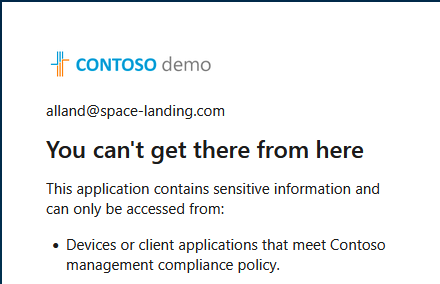
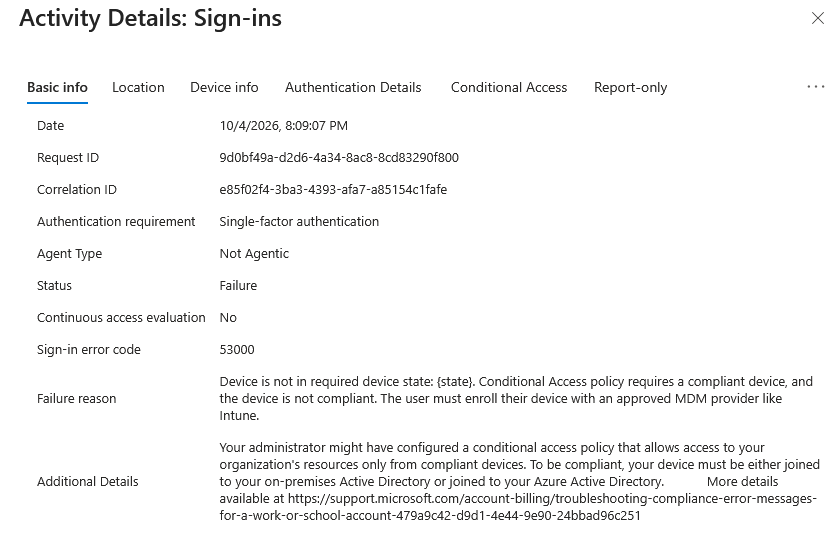
Error 53000. The device isn’t compliant, so no token.
Also, Microsoft’s own error message still tells you to join your device to Azure Active Directory. Nobody tell them.
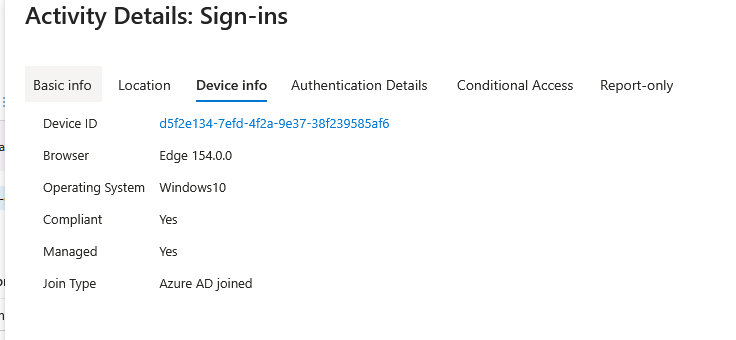
Now if a device does show as compliant, this works just fine.
Legacy authentication
This one isn’t about Okta at all, it’s about the sign-in path.
Modern authentication runs an interactive flow, and that flow is where MFA prompts and Conditional Access grant controls happen. Legacy protocols (POP, IMAP, SMTP AUTH, older Exchange ActiveSync clients) don’t use it. They pass a username and password and that’s the whole spiel.
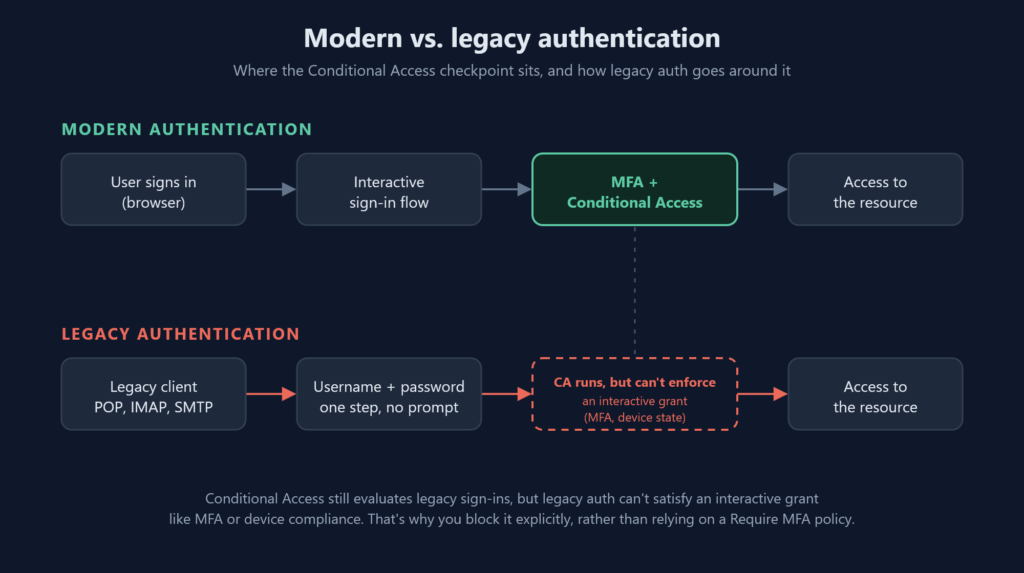
Everything you configured above depends on an interactive sign-in. Legacy auth doesn’t do one, so there’s no MFA prompt to answer and no device state to report. Conditional Access still sees the attempt, it just has no interactive grant it can enforce, so the sign-in can go through on a password alone. Which is exactly why attackers like it.
Exchange Online has already turned off Basic auth for most of its protocols, and SMTP AUTH is on its way out as of writing. But that’s Microsoft disabling things per workload on Microsoft’s schedule. A Conditional Access policy that blocks Exchange ActiveSync clients and Other clients closes the door at the identity layer, for everything, on your schedule.
Session controls
If you’ve read the AiTM series and the Token Protection post, you already know where this goes. Once Entra issues the session, the controls that matter are Entra’s. Compliant device, Token Protection, sign-in frequency.
The limits of my testing
I tested this with Okta, with federatedIdpMfaBehavior set to enforceMfaByFederatedIdp. That’s also the only value Microsoft mentions in the federated user section of their Authentication Strength docs, and the rule there is blunt: federated users can only satisfy the Federated Multi-Factor combination.
Switching to one of the other two values doesn’t fix it. With acceptIfMfaDoneByFederatedIdp (also the default if nobody ever set it), Entra takes Okta’s word that MFA happened. With rejectMfaByFederatedIdp, Entra throws out Okta’s MFA and prompts for its own. Either way, Entra never finds out Okta used a passkey. It either gets a claim saying “MFA happened” or ignores that claim completely. If you want Entra’s Phishing-resistant MFA strength, the user needs a phishing-resistant method Entra can actually see.
Authentication Strength combinations also get updated as Microsoft adds methods, so this could change at some point, because it always does.
So now what? Well…
If you need Entra’s Phishing-resistant MFA strength for federated users, the cleanest answer is to stop being federated. I wrote a whole post on that.
If you’re staying federated, you still need Conditional Access. Okta proves who someone is. Entra decides whether they get a token, and only Conditional Access gets a say in that decision.
Remember the golden rule: you never put all your cards into one tool. You layer controls and force the attacker to get lucky multiple times in a row.
So what did we learn today?
1.) When you’re federated, your IdP authenticates the user, but Entra still issues every token, and Conditional Access is evaluated right there.
2.) Alexander the Great founded roughly 20 cities and named most of them Alexandria, the most famous being Alexandria in Egypt.
3.) A phishing-resistant passkey at Okta does not satisfy Entra’s Phishing-resistant MFA Authentication Strength. Entra receives a claim that MFA happened, not the method itself, and a claim can’t satisfy a phishing-resistant requirement.
4.) Check your domain’s federatedIdpMfaBehavior setting. Most people federated to an IdP have never looked at it.
5.) When Alexander’s horse Bucephalus died in 326 BC, he founded a city on the Hydaspes River and named it Bucephala after him.
6.) Device compliance is evaluated by Entra. Your IdP can’t make that grant control pass for you.
7.) Alexander the Great was tutored as a teenager by Aristotle.
8.) Legacy auth can’t satisfy an interactive grant, so MFA and device checks silently don’t apply. Conditional Access still runs, which is why you need an explicit Block policy, not just Require MFA.

Newsletter
Get the next post by email
One email when a new post goes up, and nothing else. Every email has an unsubscribe link.