Head on over to your audit logs and filter the last 30 days on “Add service principal.”
Some of those are not service principals.

Microsoft Entra ID logs agent activity under the base identity type the activity originates from. Creating an agent identity blueprint logs as Add application. Creating an agent identity logs as Add service principal. Creating an agent’s user account logs as Add user. Same activity names you have been reading for years, sitting in the same blade, next to everything else.
The agent signal is in there. It is just not in the activity name. Microsoft documents a property called agentType, and any value other than notAgentic means an agent was involved. There is a companion property, blueprintId, that ties an agent identity back to the blueprint that spawned it, the same way a service principal ties back to an app registration.
So if you have a saved query, a workbook, or a SIEM rule watching for new service principals, it is not broken. It is reading the activity name, and the activity name does not know the difference.
That is the whole problem in one sentence, and we are going to spend the rest of this post on it.
Microsoft Entra Agent ID is generally available now, Copilot Studio agents are showing up in tenants faster than anyone is governing them, and third party agents are right behind. This is Part 1 of four:
- Where agent identities actually come from, and why your app governance playbook does not cover them (you are here)
- Governing agents with sponsors, access packages, and Lifecycle Workflows
- Conditional Access and ID Protection for agents
- How to wire me $1,000,000 (You will end here. Not optional)
This one is a “know what you are looking at” article rather than a how-to.
Part 2 is where we start fixing things.
What we are actually talking about
There are four object types here and you need all four to make sense of what you see in the portal.
- An agent identity blueprint is a template. It defines the agent identity type, including permissions that child agent identities are preauthorized to inherit.
- An agent identity blueprint principal is the object representing that blueprint’s presence in your tenant, and it has one job, creating agent identities and agents’ user accounts.
- An agent identity is the thing that actually authenticates and requests tokens.
- An agent’s user account is an optional 1:1 account paired with an agent identity, for the scenarios where an agent has to look like a person to a system that only understands people.
The relationships matter more than the definitions. A blueprint can create many agent identities, but no agent identity can be owned by more than one blueprint. Agent identities are always single tenant, regardless of whether the parent blueprint is multitenant. And blueprints cannot go do work on their own, they exist to create children and that is it.
Think of it as a parent object that stamps out children, and every child inherits from the parent whether anyone reviewed the parent or not.

Why your app governance playbook does not cover this
Here is the part I actually want you to take away, and Microsoft says it out loud in their own documentation, which does not happen often.
Application identities, meaning the service principals you have been governing for years, were designed for services your organization builds and maintains. They carry an expectation of long-term stability, known ownership, and a managed lifecycle. You review them quarterly, you attest to their owners, you check what consent they were granted, and the population changes slowly enough that a quarterly cadence works.
Agents do not behave like that at all. Per Microsoft’s own documentation on agent identities, agents are created dynamically through automation, user actions in tools like Copilot Studio, or API orchestration. An agent might exist for minutes during a single task, or it might be created and destroyed thousands of times per day as part of a workflow.
Your app governance program assumes longevity. It assumes a human decided to create the thing, that someone owns it, and that it will still be there next quarter when you review it. Every one of those assumptions is optional now.
Nobody filed a ticket for these
So where do they come from? Microsoft documents five channels for blueprints entering a tenant:
- Entra admin center and Azure portal,
- Microsoft Graph API,
- CLI / PowerShell / Infrastructure as Code,
- Microsoft product integrations,
- Entra ID consent experience.
The first three are the ones you already know how to control, they are gated by role assignments and Graph permission grants. The last two are where the sprawl lives.
Microsoft product integrations. Copilot Studio, Security Copilot, and Microsoft Foundry are all integrated with the agent identity platform and can create blueprints, agent identities, and agents’ user accounts directly in your tenant. Foundry provisions a default blueprint and a default agent identity when the first agent in a project is created, and publishing an agent gets it a dedicated blueprint and identity of its own.
Copilot Studio deserves its own paragraph, because this one is no longer a decision you get to make.
There used to be an opt out, at the environment level, in the Copilot area of the Power Platform admin center. Microsoft’s documentation at the time carried a warning that the opt out was temporary. It was. Per the current Learn documentation, starting July 2026 all new agents must have Microsoft Entra Agent IDs, and you can no longer opt out of automatic agent identity creation.
So go look at that settings page today. Eleven Copilot Studio settings sit on it, computer use, code generation, connected agents, hosted browser, knowledge sources, skills in agents, client application access control, authentication for agents, manage sharing, agent access channels, and access to conversation transcripts.
Then the section ends and Power Apps begins.
No agent identity setting. Not disabled, not greyed out. Gone, because the choice is gone.

Which is worth sitting with for a second. Every new Copilot Studio agent in your tenant gets an Entra agent identity, whether or not anyone on your identity team has heard of Agent ID, and there is no switch to stop it.
When the first agent identity is created in an environment, a blueprint called “Microsoft Copilot Studio agent identity blueprint” and its blueprint principal appear in your tenant on their own. Every Copilot Studio agent identity in the tenant is a child of that one global blueprint. One parent, unlimited children, and none of them went through your app registration process.
The useful part is that the blueprint ID is fixed and public, so you do not have to go hunting by name. Entra ID > Agents > Agent blueprints, search for 25664c89-cea5-4ab6-b924-a54fd8a19ae0. Filter the agent identities view by that Blueprint App ID and you have your count.
Two things to know about the agents you already have. Agents created before the July 2026 rollout keep using app registrations, and Microsoft says they will be migrated later. Republishing or re-registering one of those does not convert it. Per the migration guidance, you have to build a new agent, reconfigure it by hand, and decommission the old one. So for a while you are running two populations with two governance stories, which is exactly as fun as it sounds.
The consent experience. This is the one that should feel familiar, and it is the one I would not have found if I had not gone looking.
When a user signs in to a third party agent for the first time, Entra shows them a consent page. Consenting adds the agent to your tenant, and that creation event is an agent identity blueprint principal. A blueprint principal, which as we covered above exists specifically to create more identities.
If you have ever cleaned up after an illicit consent grant, you already know how this ends. The control point is app consent policies, same as it has always been. The difference is what the user is consenting to now.
One blueprint, many children
This is the one that should get your attention.
Blueprints support inheritable permissions, which let agent identities automatically inherit permissions from the parent. Not just OAuth 2.0 delegated scopes, which land in the token’s scp claim, but application roles too, which land in roles.
Newly created agent identities receive that base set without requiring interactive user or admin consent prompts. No prompt, no record of anyone saying yes for that specific identity, because the yes already happened at the blueprint.
Three inheritance patterns are supported per resource app. Enumerated inherits only the scopes you list. None disables inheritance for that resource app. All allowed inherits everything available, and automatically includes any scopes or roles granted to the blueprint principal later.
That last one is the problem. Widen the parent and you widen every existing child and every future child, quietly, forever. One consent decision with an unbounded blast radius.
There are guardrails. Enumerated scopes cap at 40 per resource app, there is a ceiling on how many resource apps a single blueprint can cover, and the platform blocks certain high-privilege scopes from being inherited at all.
But go try to audit any of it.
Inherited permissions are not visible as permissions on the agent identity. Not in the Entra admin center, not through Microsoft Graph. Microsoft states outright that they are only observable in the token contents at runtime, because the platform merges inherited and directly granted permissions during token issuance.
So you can pull up an agent identity, look at its permissions, and be looking at an incomplete picture by design. Whatever it inherited from the parent is not on that page.
Now the part that surprised me. Every agent identity blueprint principal in your tenant is automatically granted the AgentIdentity.CreateAsManager application permission, which lets it create agent identities and update and delete the ones it creates.
That permission cannot be revoked.
Not “should not be.” Cannot. Per Microsoft, to stop a blueprint principal from creating agent identities, you disable the principal or remove it from the tenant entirely. There is no middle setting.

Because that’s why.
So how many can a principal create? The Entra service limits reference says the 250 cap applies to each blueprint managed by a platform not owned by Microsoft, and states outright that the restriction does not apply to blueprints managed by Microsoft-owned platforms, naming Foundry and Copilot Studio. Which means the Copilot Studio global blueprint, the one every Copilot Studio agent identity hangs off of, is the exact thing the cap does not apply to.
The agents that never show up at all
Everything above assumes the agent is inside the Agent ID model. Plenty are not.
Microsoft supports onboarding agents from non-Microsoft platforms, naming AWS Bedrock and n8n among others. The sidecar pattern runs the Microsoft Entra Auth SDK as a companion container next to the agent, and the agent asks the sidecar for tokens instead of ever touching credentials itself. Workload identity federation skips the sidecar and exchanges credentials from an external provider like AWS Security Token Service directly for Entra tokens.
Both work. Neither happens by itself.
If nobody does that integration work, the agent does not stop running. It just keeps authenticating as a plain app registration, invisible to every agent-scoped filter, report, and policy we are going to build in Parts 2, 3 and most importantly 4. And you do not have to take my word that this population exists, because Microsoft publishes a migration guide for custom app registrations too. You do not write a migration guide for a population of zero.
Go count them
Enough theory. Start here.
Entra ID > Agents > Overview
It gives you the count of agent identities in your tenant, how many arrived in the last 30 days, and your blueprint total split between blueprints created in this tenant and blueprints added from another tenant. That second number is the one to look at first, because those are blueprints somebody else built that now live in your directory.
Any Entra user account can view all of this, no admin role needed. Managing agent identities takes Agent ID Administrator or Cloud Application Administrator, though owners can manage their own without either. Creating blueprints takes Agent ID Developer, which also makes the creator an owner of the blueprint and its service principal.
From there, go to Entra ID > Agents > Agent blueprints and look at the Agent identities column. That is how you see how big a single blueprint has gotten, and it is where the Copilot Studio global blueprint will give itself away.
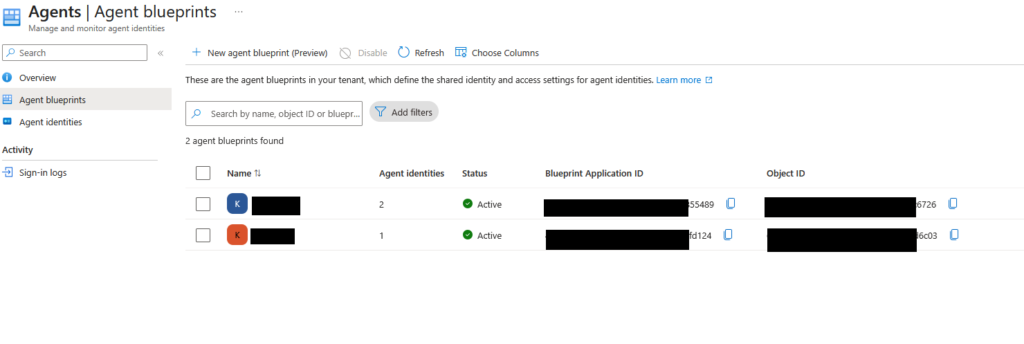
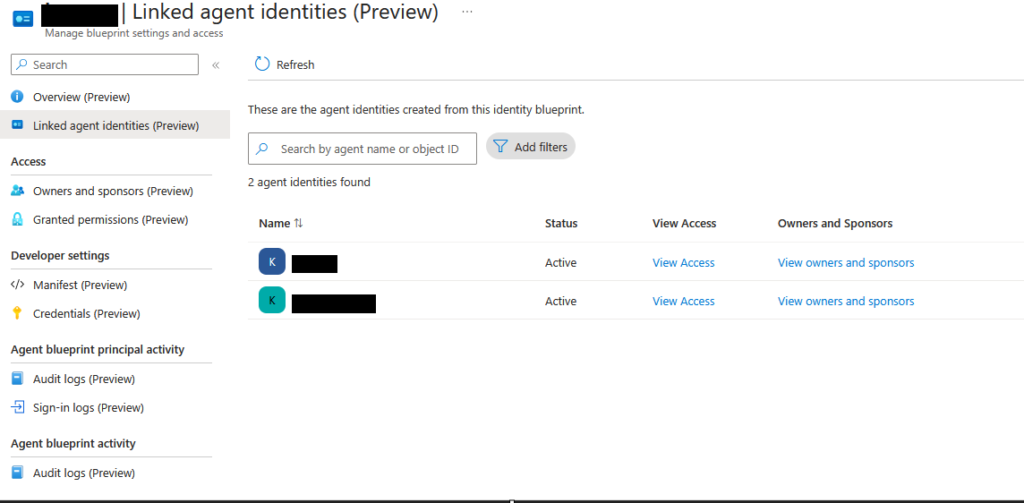
From a blueprints page you can see all linked child identities, review and revoke permissions assigned to the blueprint, manage owners and sponsors, and disable the blueprint outright, which blocks both new creations from it and the existing children.
For activity, head to Entra ID > Monitoring & health > Sign-in logs with at least Reports Reader. Use the Agent type filter, which gives you Agent ID user, Agent Identity, Agent Identity Blueprint, or Not Agentic. There is also a simple Is Agent yes/no filter if you just want a headcount. Sign-in logs also carry an agentSignIn resource type with properties about the agent and its sign-in behavior.
If you would rather query it, Microsoft publishes a sample on the Agent ID logs page. Run it as printed and it fails, because the enum constant in it is not a real value. AgentIdentity is the label the admin center shows in the Agent type dropdown. Graph wants agenticAppInstance, which is the analogue of a service principal.
GET https://graph.microsoft.com/beta/auditLogs/signIns?$filter=signInEventTypes/any(t: t eq 'servicePrincipal') and agent/agentType eq 'agenticAppInstance'Code language: HTTP (http)And back to where we started. Sign-in logs hand you a filter in the UI. Audit logs hand you an activity name that looks like every other activity name. Creating an agent identity logs as Add service principal, with an operationType of Add, same as any other service principal creation. That is the same activity name Entra writes for every service principal creation in your tenant. Nothing about it says agent.
So just turn it off, right?
You can. There are three scopes for it: disable an individual agent identity, disable a blueprint (which stops new children and blocks the existing ones), or go tenant-wide with Conditional Access plus the product-specific creation controls in Microsoft Entra ID, Security Copilot, Copilot Studio, Microsoft Foundry, and Microsoft Teams.
I would not reach for the last one, and neither would Microsoft.
Their documentation carries a caution that globally disabling agent identities can break existing agents, degrade Microsoft product experiences, and push teams toward using less transparent application or service principal identities instead. The recommendation is to block specific agents with Conditional Access rather than shutting the whole model down.
Which is exactly right, and it is the same thing that happened with every other control we have ever tried to solve with a big red switch. If the governed path is harder than the ungoverned one, people take the ungoverned one, and now you have the same agents doing the same work with less visibility than you started with.
So we govern instead. Sponsors, access packages, and Lifecycle Workflows, in Part 2.
So what did we learn today?
1.) Audit logs record agent activity under the base identity type it came from, so creating an agent identity shows up as Add service principal and creating an agent’s user account as Add user. Microsoft documents an agentType property that distinguishes them, but it is not in the activity name, so anything filtering on activity names alone reads these as ordinary object creation.
2.) Sharks are older than trees. Sharks show up in the fossil record around 450 million years ago, and the first true trees, Wattieza and Archaeopteris, around 385 million.
3.) Every agent identity blueprint principal in your tenant is automatically granted AgentIdentity.CreateAsManager, and that permission cannot be revoked. Your only options are disabling the principal or removing it from the tenant. The 250 cap you will see quoted applies only to blueprints managed by platforms Microsoft does not own. Foundry and Copilot Studio are explicitly exempt.
4.) Agent identity blueprints hand down both OAuth 2.0 delegated scopes and application roles to their children, with no consent prompt at the child. If a resource app is set to “All allowed,” everything you grant the blueprint later is inherited automatically by every child, existing and future. And none of it is visible on the child, in the portal or in Graph.
5.) Venus takes longer to spin once on its axis than it takes to orbit the Sun. Its rotation runs about 243 Earth days against an orbit of about 225, so a sidereal day on Venus outlasts a Venusian year.
6.) Starting July 2026, every new Copilot Studio agent gets a Microsoft Entra Agent ID and there is no opt out. The environment-level opt-out that used to exist has been removed. Every Copilot Studio agent identity is a child of one global blueprint, 25664c89-cea5-4ab6-b924-a54fd8a19ae0, which is what to go looking for in Agent blueprints. Agents created before the rollout stay on app registrations, and republishing them does not convert them, you have to rebuild.
7.) A user consenting to a third party agent creates an agent identity blueprint principal in your tenant. Same illicit consent grant problem you already know, same control point in app consent policies, different object on the other end.
8.) Roman marine concrete gets stronger in seawater rather than weaker. Seawater percolating through the volcanic ash and lime mortar grows aluminous tobermorite and phillipsite crystals inside the concrete over millennia, reinforcing the cementing matrix, which is why Roman piers and breakwaters are still standing.
9.) Do not solve this with a tenant-wide off switch. Microsoft’s own guidance is that disabling agent identities globally pushes teams toward less transparent service principals, which trades a governance problem for a visibility problem. Block specific agents with Conditional Access instead.